Account Loyalty Report (Accounts)
The Account Loyalty Report provides usage data for loyalty accounts and programs. Loyalty accounts provide incentives to members in order to encourage repeat visits. This feature offers two different programs: member discounts and frequent shopper rewards. The discount application entitles club members to discounts on one or more wash products. The frequency application functions as an electronic punch card that provides rewards for repeat customers (e.g., buy 4 washes, receive a 5th wash free).
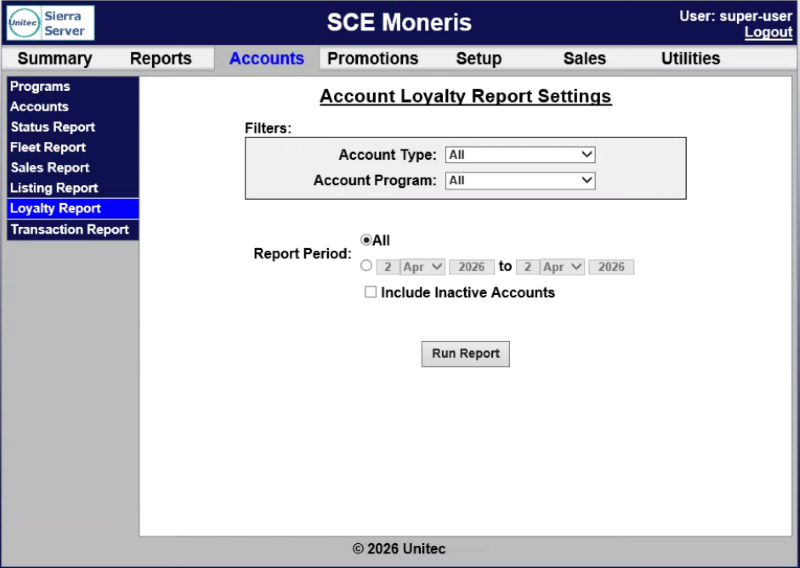
Account Loyalty Report Settings
The Account Loyalty Report Settings panel provides the ability to generate an account loyalty report for all account types, a specific account type, all account programs, a specific account program, for all time or a specific time range.
Account Type
The Account Type setting provides the ability to generate the report for All account types (the default) or a specific account type.
Account Program
The Account Program setting provides the ability to generate the report for All account programs (the default) or a specific program.
Report Period
The Report Period setting provides the ability to generate the report for the all time or a date range.
All
The All setting provides the ability to generate the report for all time.
Date Range
The Date Range setting provides the ability to generate the report from one specific date to another specific date.
Include Inactive Accounts
The Include Inactive Accounts setting provides the ability to generate the account loyalty
Run Report
The Run Report function generates the Account Loyalty Report for the selected settings.
Account Loyalty Report Data
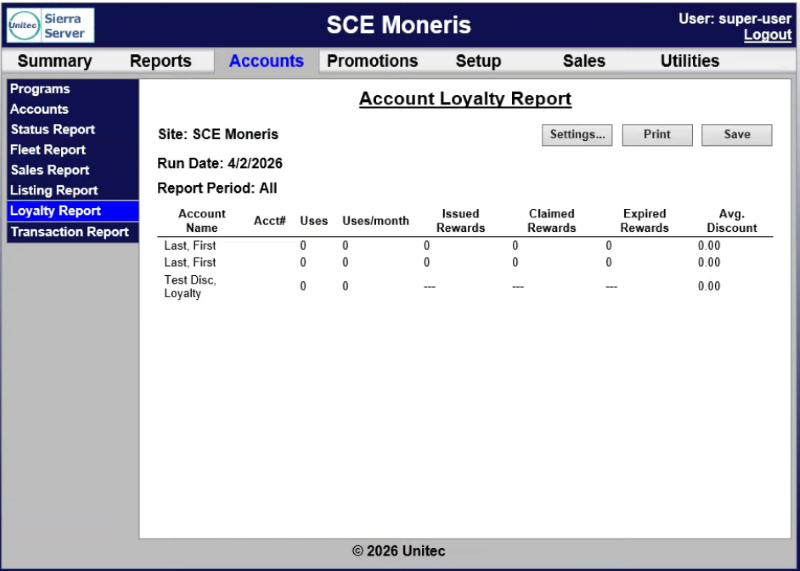
The Account Loyalty Report data is organized in a table. It can be re-generated with different settings (Settings...) printed or saved in a CSV file (Save).
Settings... | Print | Save
The Account Loyalty Report includes functions to re-generate it, print it, or save it.
Settings...
The Settings... function provides the ability to re-generate the report with different settings.
The Print function provides the ability to print the currently generated report.
Save
The Save function provides the ability to save the currently generated report in a CSV file.
Account Name
The Account Name column provides the name, in Last, First format, if available, for the corresponding account.
Acct#
The Acct# column provides the account identification number, if available, assigned to the corresponding account.
Uses
The Uses column provides the cumulative uses, if any, by the corresponding account for the selected time period
Uses/month
The Uses/month column provides the number of uses per month, if any, by the corresponding account for the selected time period.
Issued Rewards
The Issued Rewards column provides the number of rewards, if any, the corresponding account received for the selected time period.
Claimed Rewards
The Claimed Rewards column provides the number of issued rewards that were redeemed, if any, by the corresponding account for the selected time period.
Expired Rewards
The Expired Rewards column provides the number of issued, but unclaimed, rewards that expired, if any, for the corresponding account for the selected time period.
Avg. Discount
The Avg. Discount column provides the average value of the discount the corresponding account received, for the selected time period.
Updated: 042726