Account Status Report (Accounts)
The Account Status Report provides the ability to generate a status report for a specific account category, specific account, all account categories, or all accounts..
Account Status Report Settings
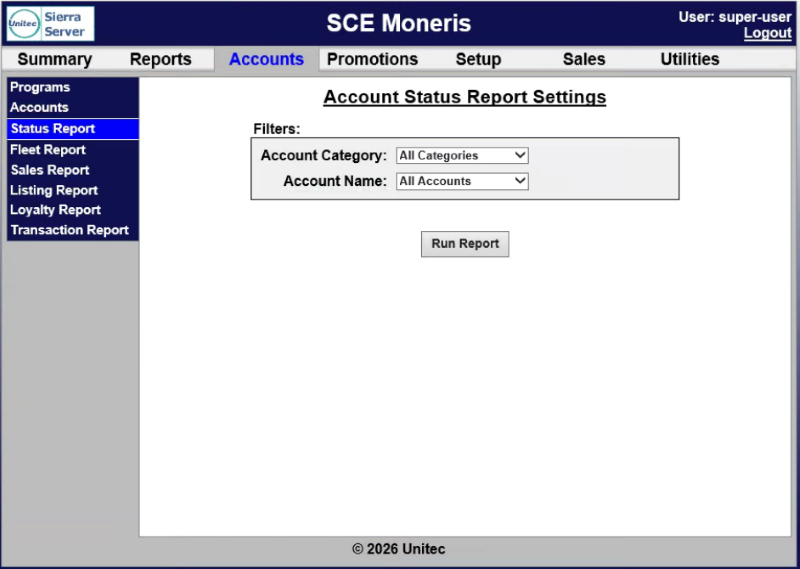
The Account Status Report Settings panel provides report parameters for generating the report.
Account Category
The Account Name setting provides the ability to generate the report for All Accounts or a specific account.
Account Program
The Account Program setting provides the ability to generate the report for All Programs or a specific program.
Run Report
The Run Report function generates the Account Status Report for the selected settings.
Account Status Report Data
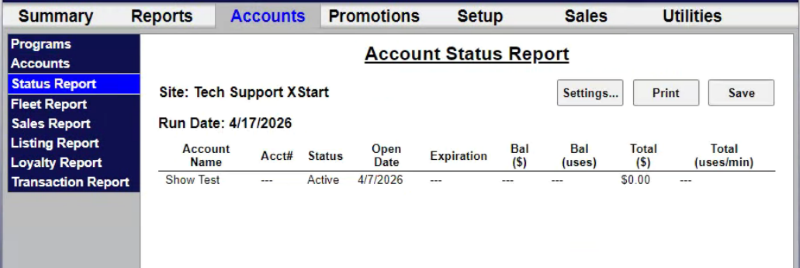
The Account Status Report data is organized in a table. It can be re-generated with different settings (Settings...) printed or saved in a CSV file (Save).
Settings... | Print | Save
The Account Status Report includes functions to re-generate it, print it, or save it.
Settings...
The Settings... function provides the ability to re-generate the report with different settings.
The Print function provides the ability to print the currently generated report.
Save
The Save function provides the ability to save the currently generated report in a CSV file.
Account Name
The Account Name column provides the name, in Last, First format, if available, for the corresponding account.
Acct#
The Acct# column provides the account identification number, if available, assigned to the corresponding account.
Status
The Status column provides the current status, for example, Active, for the corresponding account.
Open Date
The Open Date column provides the date, in MM/DD/YYYY format, the account first opened.
Expiration
The Expiration column provides the expiration date, if one applies, in MM/DD/YYYY format, the expires.
Bal ($)
The Bal ($) column provides the current remaining monetary balance, if one applies, for the account.
Bal (uses)
The Bal (uses) column provides the current remaining usage balance, if one applies, for the account.
Total ($)
The Total ($) column provides the total monetary value, if one applies, for the account.
Total (uses/min)
The Total (uses/min) column provides the average number of uses for the account.
Updated: 042726