Code Listing Report (Reports)
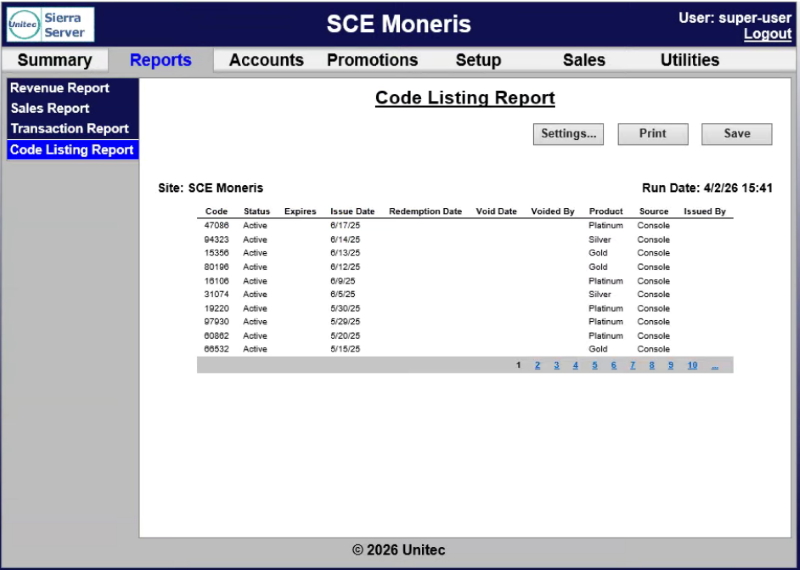
The Code Listing Report panel provides a list of wash codes sold at a C-store POS or fuel for sites that use the optional POS interface or console for wash code sales. It can be used to check the status of a specific code by entering all or part of the code number. A generated report can be printed or exported to a CSV file for using with a third-party accounting application, such as Microsoft Excel.
Code Listing Report Settings
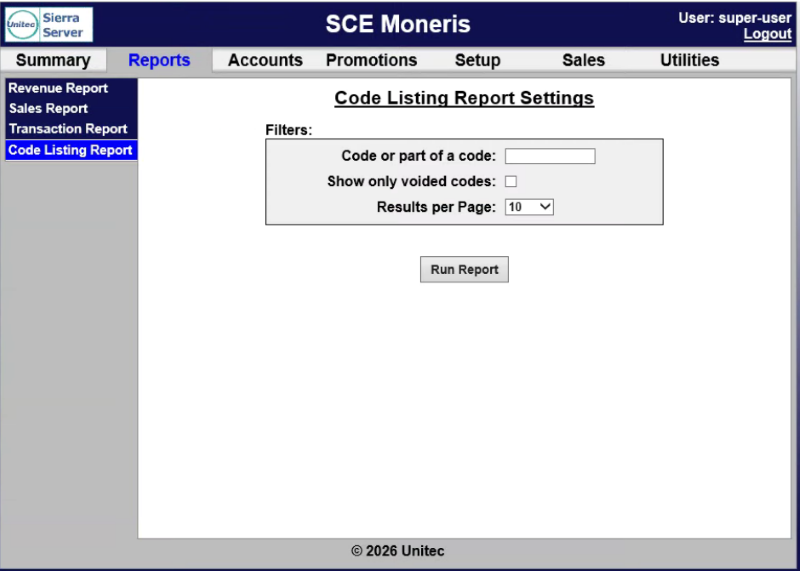
The Code Listing Report Settings panel provides report parameters for generating the report.
Code or part of a code
The Code or part of a code setting provides the ability to specify which code(s) to include in the report.
- Specific Code: Enter a code to generate the report for one specific code.
- Partial Code Matches: Enter part of a code to generate the report for only codes that match the partially provided code.
- All Codes: Don't enter any code to generate the report for all codes.
Show only voided codes
The Show only voided codes setting provides the ability to generate the report for only voided codes.
Results per Page
The Results per Page setting provides the ability to specify the number of codes to display per page.
Run Report
The Run Report function generates the report for the specified settings.
Code Listing Report Data
The Code Listing Report data is organized in a table, with corresponding data for each code in the generated report.
Code
The Code column provides the issued wash codes, listed in chronological order.
Status
The Status column provides the code status will be shown as Active, Used or Expired.
Expires
The Expires column provides the date the code expires.
Issue Date
The Issue Date column provides the date the code was issued.
Redemption Date
The Redemption Date column provides the date the code was used (if used).
Void Date
The Void Date column provides the date the code was voided (if voided).
Voided By
The Voided By column identifies the user ID of the attendant that voided the code (if voided).
Product
The Product column provides the wash package sold.
Source
The Source column identifies whether the code was sold from a console, C-store POS register or purchased at the pump.
Issued By
For codes sold at the console, the Issued By column provides the user ID of the attendant that issued the code ticket.
Report Page Navigation Functions
If more than 15 records are returned for the report query, use the page navigation at the lower right corner of the table.
Updated: 042726