Transaction Report (Reports)
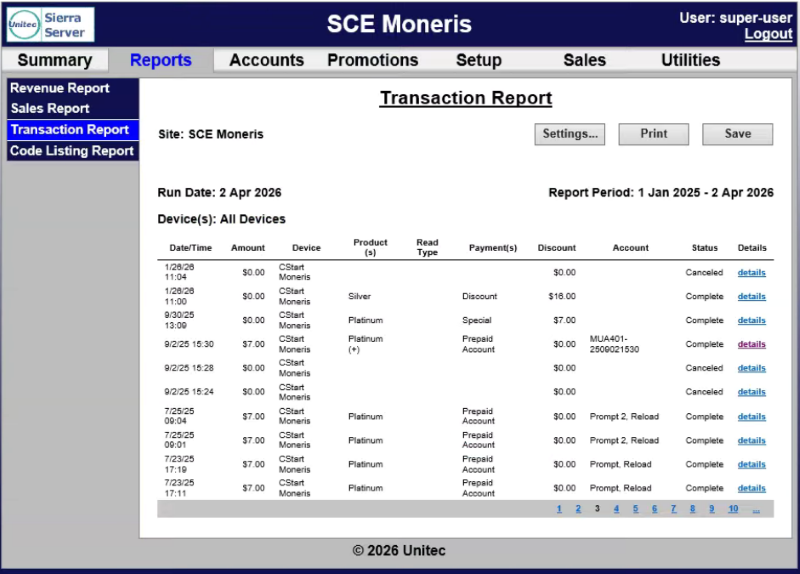
The Transaction Report panel provides a list of all transactions that were recorded over the reporting period. Reports can be generated for the current business day, previous day or for a user-specified date range. A generated report can be printed or exported to a CSV file for using with a third-party accounting application, such as Microsoft Excel.
Transaction Report Settings
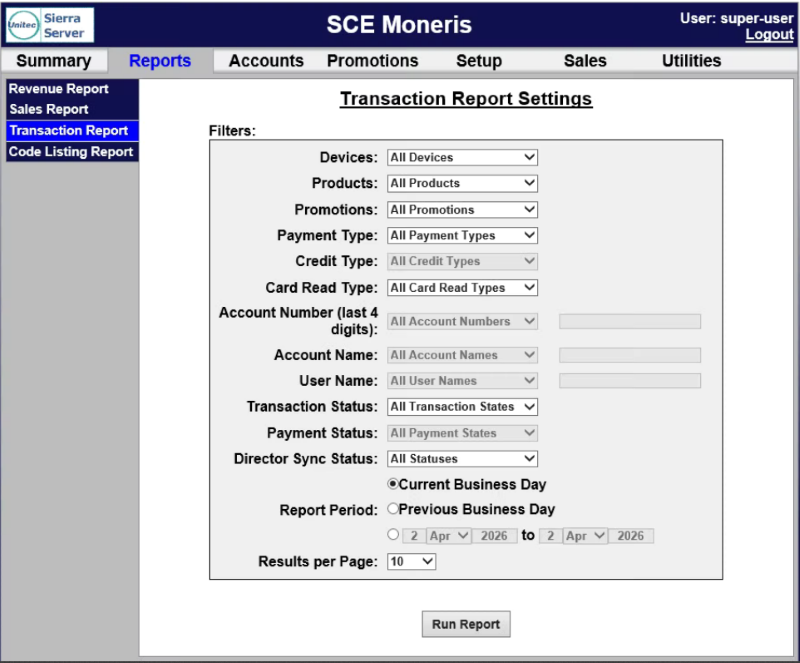
The Transaction Report Settings panel provides report parameters for generating the report.
Devices
The Devices setting provides the ability to generate the report for transactions at a single or all payment device on the site.
Products
The Products setting provides the ability to generate the report for transactions that included a specific product (wash or added service).
Promotions
The Promotions setting provides the ability to generate the report for transactions that included a specific promotion.
Payment Type
The Payment Type setting provides the ability to generate the report for transactions that included a specific payment type (cash, credit, house account, etc.).
Credit Type
The Credit Type setting provides the ability to generate the report for transactions that included a specific credit payment brand.
Card Read Type
The Card Read Type setting provides the ability to generate the report for transactions that included a specific payment card submission method.
Account Number (last 4 digits)
The Account Number (last 4 digits) setting provides the ability to generate the report for transactions that included a payment card with specific digits for the last 4 digits of the payment card.
User Name
The User Name setting provides the ability to generate the report for transactions that included a specific user's name.
Transaction Status
The Transaction Status setting provides the ability to generate the report for transactions that included a specific transaction status.
Payment Status
The Payment Status setting provides the ability to generate the report for transactions that included a specific payment payment status.
Director Sync Status
The Director Sync Status setting provides the ability to generate the report for transactions that included a specific Director sync status.
Report Period
The Report Period setting provides the ability to generate the report for the current day, previous day, or a date range.
Current Business Day
The Current Business Day setting provides the ability to generate the report for the current day.
Previous Business Day
The Previous Business Day setting provides the ability to generate the report for the previous day.
Date Range
The Date Range setting provides the ability to generate the report for a user-specified date range, from one selected day, month, and year to another selected day, month, and year.
Results per Page
The Results per Page setting provides the ability to specify the number of transactions to display per page.
Run Report
The Run Report function generates the Transaction Report for the selected settings.
Transaction Report Data
The Transaction Report data is organized in a table, with corresponding data for each transaction in the generated report.
Date/Time
The Date/Time column provides the date and time the transaction was recorded.
Amount
The Amount column provides the monetary amount recorded for the transaction.
Device
The Device column provides the device that recorded the transaction.
Product(s)
The Product(s) column provides the product(s) recorded for the transaction.
Read Type
The Read Type column provides payment card entry method recorded for the transaction.
Payment(s)
The Payment(s) column provides the specific payment type used. This column will show Multiple for a transaction that included multiple payment types (split-tender).
Discount
The Discount column provides the discount(s) applied for the transaction.
Account
The Account column provides the last four numbers of the credit card or house account recorded for the transaction.
Status
The Status column provides the payment card processing response recorded for the transaction. It will display processed (transaction was completed), cancelled (customer cancelled the transaction before it could be completed), or pending (transaction was started was not completed, still in process).
Details
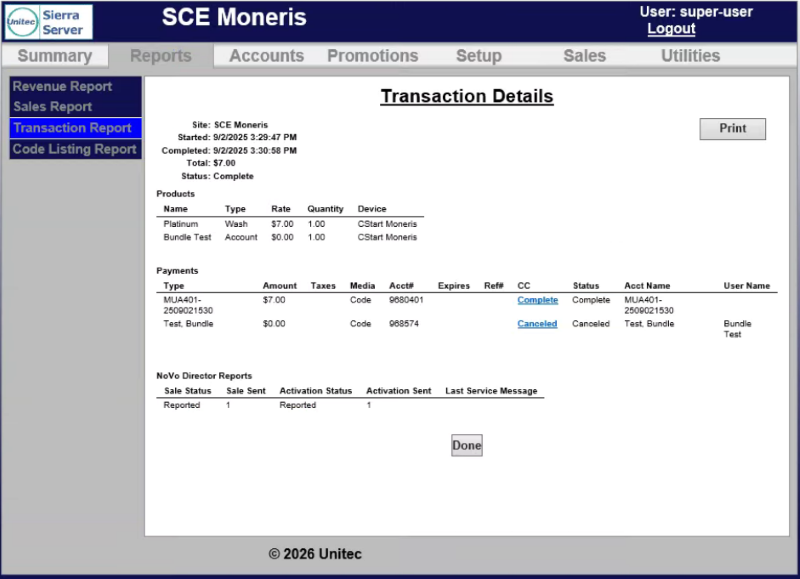
The Details column provides a function for each transaction. The function opens a Transaction Details panel, which provides a more detailed record of the transaction, which can also be printed.
Updated: 042726