All Device Profiles for this Site (Setup)
The All Device Profiles for this Site panel provides the ability to view, edit, or delete existing device profiles, as well as add new device profiles. Device profiles are configuration files that control the operation of the associated hardware devices at a site. If all devices on site should use the same workflow, a single profile can be configured and downloaded to all devices. If workflows will vary among devices (for example, one unit is on an in-bay automatic and the other on a conveyor), one or more additional device profiles must be configured. Additional profiles can be configured as new or copied from an existing profile and modified as needed.
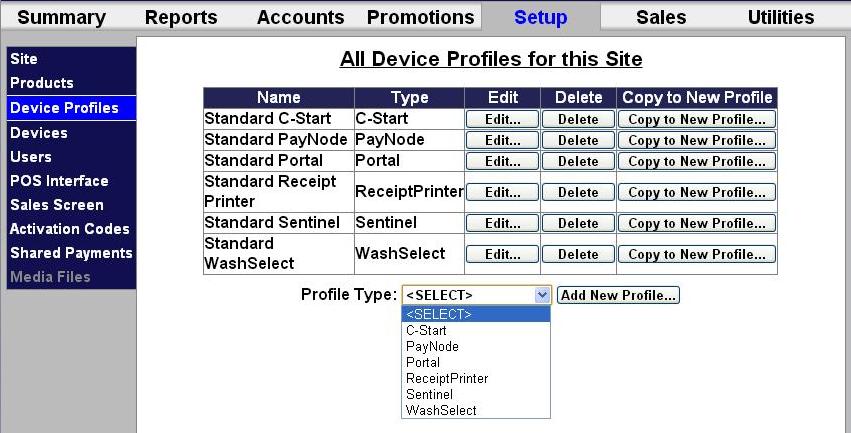
Existing Device Profiles List
The configured device profiles for a site are listed in a table on the All Device Profiles for this Site panel. It includes functions to edit, delete, and duplicate an existing profile.
Name
The Name column provides the device profile's name.
Type
The Type column provides the type of device which will use the device profile.
Edit
The Edit column provides an Edit... function that opens the corresponding device profile's Edit Profile Information panel.
Delete
The Delete column provides a Delete function that opens a prompt appears, asking Are you sure you want to delete the selected profile? Select OK to delete the profile. Select Cancel to keep the profile.
Copy to New Profile
The Copy to New Profile column provides a Copy to New Profile... function that creates a new device profile identical to the one for which the function was selected and opens the Edit Profile Information panel for the new profile.
Add
The All Device Profiles for this Site panel provides functions to add new profiles.
Profile Type
The Profile Type function provides the ability to specify the type of profile to add.
- C-Start
- PayNode
- Portal
- ReceiptPrinter
- Sentinel
- WashSelect
- X-Start
Add New Profile
The Add New Profile function creates a new profile for the type selected in the Profile Type drop-down list and opens its Edit Profile Information panel.
Updated: 042726