Summary
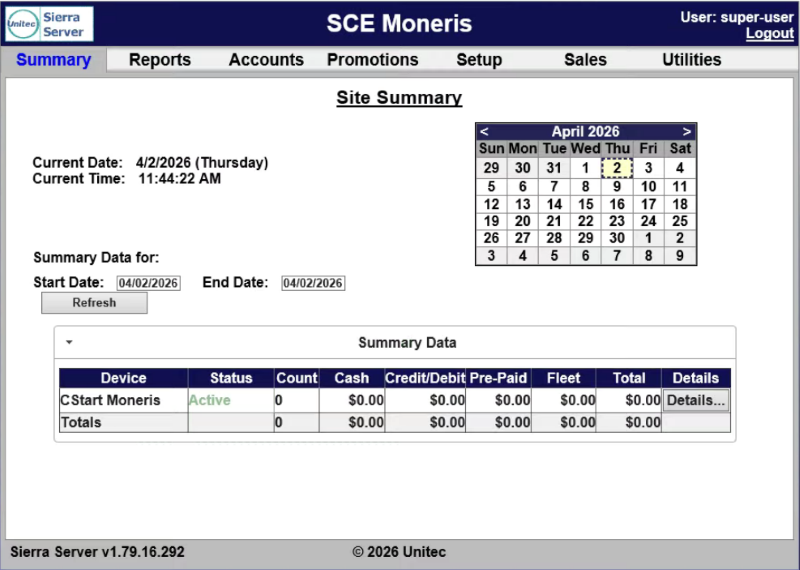
The Site Summary (Summary) panel provides a list of devices present on the local network, with a count of washes provided and associated revenue for the current day. View car counts and revenue results from previous days by selecting the desired date in the calendar or by entering the start and end dates in Start Date and End Date, respectively. The current day data can be updated by selecting Refresh. Select the arrow to the left of Summary Data to hide the financial data from view.
Current Date
The Current Date provides today's date and day in MM/DD/YYYY (Day of Week) format.
Current Time
The Current Time provides the time in HH:MM:SS AM/PM format.
Calendar
The Calendar provides the ability to select and view the summary data for a different date.
Summary Data for
The Summary Data for section provides the ability to specify a date range, refresh the data, and view the specified data in a table.
Start Date | End Date
The Start Date setting and End Date setting provide the ability to specify a date range for the summary data.
Refresh
The Refresh function provides the ability to update the summary data in the table.
Data Table
The summary data table provides the following information for each device: status, count, payment amounts, prepaid amounts, fleet amounts, and total, along with a function to view more detailed information for the corresponding device.
Device
The Device column provides the name of each device.
Status
The Status column provides the status of the corresponding device, for example, Active.
Count
The Count column provides the number of transactions for the corresponding device.
Cash
The Cash column provides the sum of revenue recorded, via cash transactions, for the corresponding device.
Important: The X-Start is a cashless kiosk terminal, so this will be $0.
Credit/Debit
The Credit/Debit column provides the sum of revenue recorded, via credit/debit transactions, for the corresponding device.
Pre-Paid
The Pre-Paid column provides the sum of revenue recorded, via pre-paid transactions, for the corresponding device.
Fleet
The Fleet column provides the sum of revenue recorded, via fleet transactions, for the corresponding device.
Total
The Total column provides the sum of all revenue recorded for the corresponding device.
Details
The Details column provides a Details... function that can be used to access additional information for the corresponding device from the Device Details panel.
Device Details
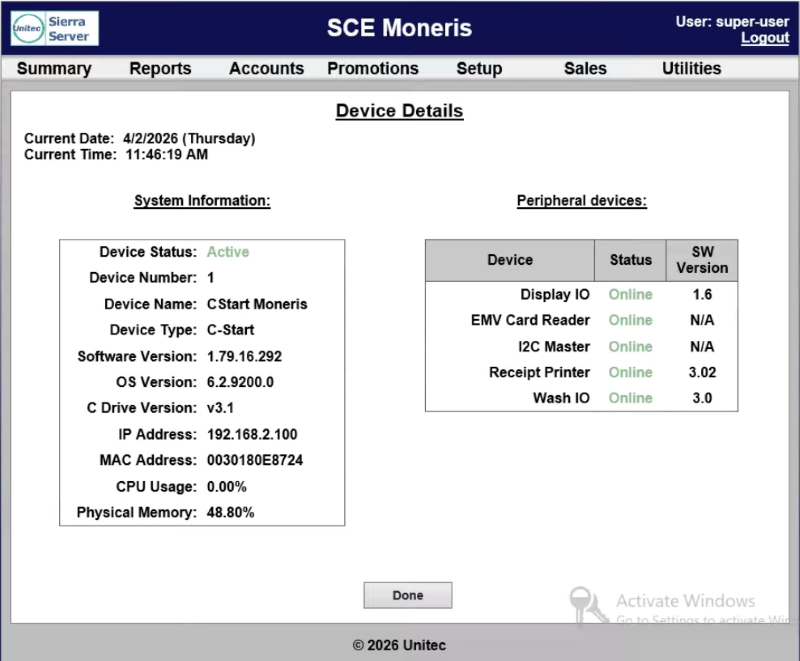
The Device Details panel, accessible from the Site Summary panel, provides system and peripheral information for the corresponding device.
Updated: 042726