View Event List Settings (Utilities)
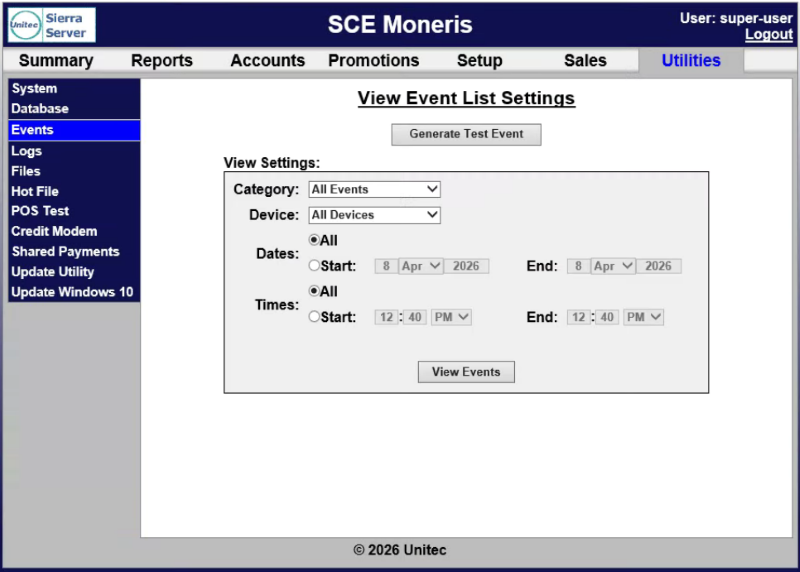
The View Event List Settings (Utilities) panel provides the ability to view all or select system events. Events can be filtered based on category, device, and date and time. A function to generate a test event to ensure the log is updating properly is also available.
Generate Test Event
The Generate Test Event function provides the ability to generate a test event to ensure the log is updating properly.
View Settings
The View Settings section provides the ability to specify the category, device, and date/time range for which to view event list settings.
Category
The Category setting provides the ability to view event list settings for All Events (default) or a specific event.
Device
The Device setting provides the ability to view event list settings for All Devices (default) or a specific device.
Dates
The Dates section provides the ability to specify whether to generate the event list settings for all dates or a specific date range (start and end).
All
The All setting provides the ability to generate the event list settings for all dates.
Start | End
The Start and End date settings provides the ability to specify a starting time (hours and minutes) and ending time (hours and minutes) for which to generate the event list settings.
Times
The Times section provides the ability to specify whether to generate the event list settings for all time or a specific time range (start and end).
All
The All setting provides the ability to generate the event list settings for all time.
Start | End
The Start and End time settings provides the ability to specify a starting time (hours and minutes) and ending time (hours and minutes) for which to generate the event list settings.
View Events
The View Events function displays the event list settings based on the selected settings.
Updated: 042726