Hot File Management (Utilities)
The Hot File Management panel provides a record of the credit cards that were declined or listed as stolen. Use it to select the card type, account number, and/or date range.
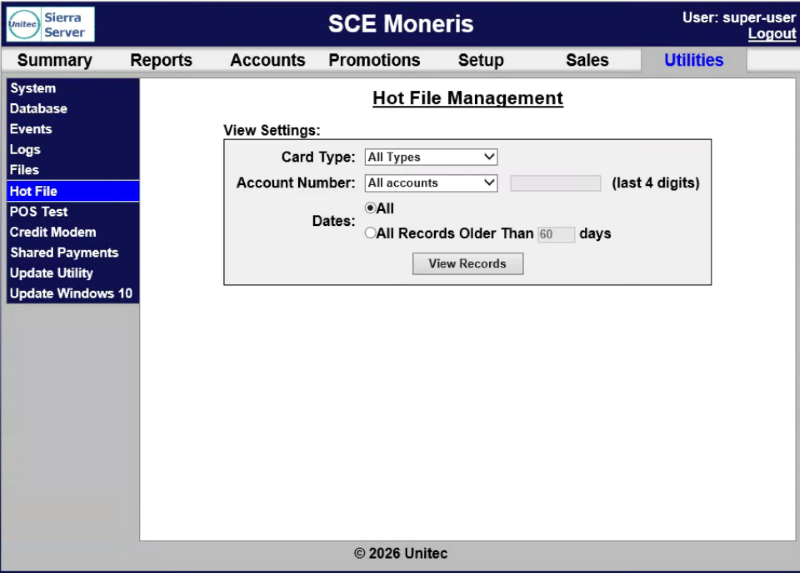
View Settings
The View Settings section provides the ability to specify the card type, account number, and dates for which to view hot files.
Card Type
The Card Type setting provides the ability to view the hot file list for All Types (default) or a specific card type.
Account Number (last 4 digits)
The Account Number (last 4 digits) setting provides the ability to view the hot file list for All accounts (default) or a specific card account (last 4 digits).
Dates
The Dates section provides the ability to specify whether to generate the hot file list for all dates or all records older than the specified days.
All
The All setting provides the ability to generate the hot file for all dates.
All Records Older Than _ days
The All Records Older Than _ days setting provides the ability to specify the number of days "older than" for which to generate the hot file list.
View Records
The View Records function opens the View Hot File panel with the hot file list based on the selected settings.
View Hot File
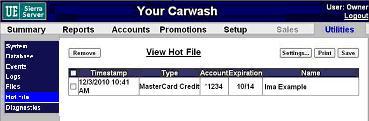
The View Hot File panel, opened from the Hot File Management panel, provides information about the payment card(s) in the hot file list.
Remove
The Remove function provides the ability to remove a selected card from the hot file list. Use this function, for example, to remove a debit card that had a zero balance a week ago, but that has had funds added since.
Settings
The Remove function provides the ability to open the Hot File Management panel and generate the hot file list with different settings.
The Print function provides the ability to print the current hot file list.
Save
The Save function provides the ability to export the current hot file list.
Hot File List
The Hot File List provides a list of all matching payment cards in a table format, with time stamp, card type, account number, card expiration date, and card name.
Timestamp
The Timestamp column provides the date and time, in MM/DD/YYYY HH:MM AM/PM format, the card was added to the hot file list.
Type
The Type column provides the corresponding payment card brand type, for example MasterCard Credit.
Account
The Account column provides the corresponding payment card last 4 digits, for example, *4321.
Expiration
The Expiration column provides the corresponding payment card expiration date, for example, 12/28.
Name
The Name column provides the name associated with the payment card.
Updated: 042726